# Maintenance Mode
Maintenance Mode prevents the AIR Console from generating or assigning tasks to an asset. When activated, the Console will not allow you to create tasks for that asset—this includes manual task creation, scheduled tasks, and bulk task assignments.
{% hint style="warning" %}
**Key Point:** Maintenance Mode is a console-side control. The Responder continues to operate normally, but the Console blocks all task creation for the maintained asset.
{% endhint %}
## How It Works
When you place an asset into Maintenance Mode:
1. **Task creation is blocked** — You cannot generate new tasks for the asset from the Console
2. **Scheduled tasks are skipped** — Any scheduled tasks that would target this asset will not execute
3. **Bulk tasks exclude the asset** — The asset is automatically excluded from bulk task operations
4. **In-progress tasks continue** — Tasks that were already executing when Maintenance Mode was activated will run to completion
### What Remains Available
To support essential diagnostic and investigative activities, the following actions are still permitted:
| Action | Status | Reason |
| --------------------- | ----------- | ------------------------------------ |
| **interACT** | ✅ Available | Essential for live diagnostics |
| **Log Gathering** | ✅ Available | Required for troubleshooting |
| **New Task Creation** | ❌ Blocked | Primary function of Maintenance Mode |
| **Scheduled Tasks** | ❌ Blocked | Prevented by Console |
| **Bulk Tasks** | ❌ Blocked | Asset is excluded |
## Enabling Maintenance Mode
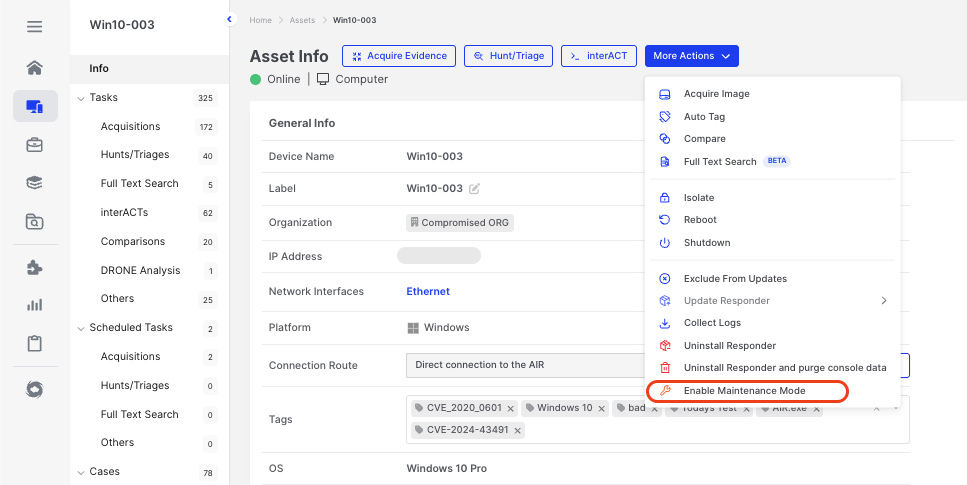
Maintenance Mode can be enabled from the **More Actions** menu on any asset.
Maintenance Mode: Enabling via the More Actions button
## Visibility and Status
When an asset is in Maintenance Mode, this status is clearly visible:
* **Asset Details Page**: The Maintenance Mode status is displayed in the asset information panel
* **Asset Filters**: Filter by Maintenance Mode status to identify maintained assets across large environments
Maintenance Mode: Status displayed on the Asset Info page
## Use Cases
### Planned Maintenance Windows
During system updates, patches, or configuration changes, activate Maintenance Mode to ensure no tasks—manual or automated—can be created for the asset until maintenance is complete.
### Diagnostic Sessions
When troubleshooting an asset, Maintenance Mode prevents accidental task execution while you investigate. interACT and log gathering remain available for diagnostics.
### Handling Cloned or Duplicated Assets
When working with cloned or duplicated asset instances, Maintenance Mode prevents conflicting task assignments. This helps analysts maintain chain-of-custody and ensures collected information remains contextually accurate.
{% hint style="success" %}
**Best Practice:** When working with cloned environments or forensic duplicates, place the original asset in Maintenance Mode to prevent task conflicts and preserve evidence integrity.
{% endhint %}
## Comparison with Asset Isolation
Both features control asset behaviour, but serve different purposes:
| Feature | Maintenance Mode | Asset Isolation |
| ------------------- | --------------------- | ------------------- |
| **Primary Purpose** | Prevent task creation | Network containment |
| **Network Access** | Normal | Terminated |
| **Task Creation** | ❌ Blocked | ✅ Allowed |
| **Scheduled Tasks** | ❌ Blocked | ✅ Execute normally |
| **interACT** | ✅ Available | ✅ Available |
| **Acquisition** | ❌ Blocked | ✅ Available |
| **Hunt/Triage** | ❌ Blocked | ✅ Available |
{% hint style="info" %}
**When to use which?**
* Use **Maintenance Mode** when you need to prevent any task creation for an asset—keeping it operational but protected from Console-initiated actions
* Use **Asset Isolation** when you need to contain a potentially compromised asset on the network while continuing forensic collection
{% endhint %}