

MCP Server Integration
AIR ships a built-in MCP (Model Context Protocol) server. Once connected, an MCP-capable AI assistant — Cursor, Claude Desktop, VS Code Copilot, and others — can work directly with your AIR tenant: list assets, read and summarize cases, launch acquisitions, run hunts and triage, check task status, and query investigations, all under the permissions of the API token you issue.
This guide walks an AIR administrator through the full setup: creating an API token, building the connection URL, configuring the assistant, and verifying the result.
Estimated time: 5 minutes.
Before you start
Section titled “Before you start”| Requirement | Detail |
|---|---|
| AIR version | The MCP endpoint is available from AIR 5.23.0 onward. |
| AIR role | Global administrator — required to create API tokens. If two-factor authentication is enabled on your tenant, it must be verified on your account. |
| Licensing | API Tokens must be enabled by your AIR license. If Integrations > API Tokens is greyed out, contact your Binalyze representative. |
| MCP client | Any MCP-capable assistant that supports remote (HTTP) MCP servers, for example Cursor, Claude Desktop, or VS Code. |
| Network | The machine running the assistant must be able to reach your AIR Console over HTTPS on the same host and port you use in the browser. |
Step 1: Create an API token in AIR
Section titled “Step 1: Create an API token in AIR”The MCP server authenticates with a standard AIR API token. The token defines who the AI assistant is and what it is allowed to do.
-
Sign in to your AIR Console as a global administrator.
-
In the left navigation, open Integrations.
-
Select API Tokens.
-
Click + Add New.
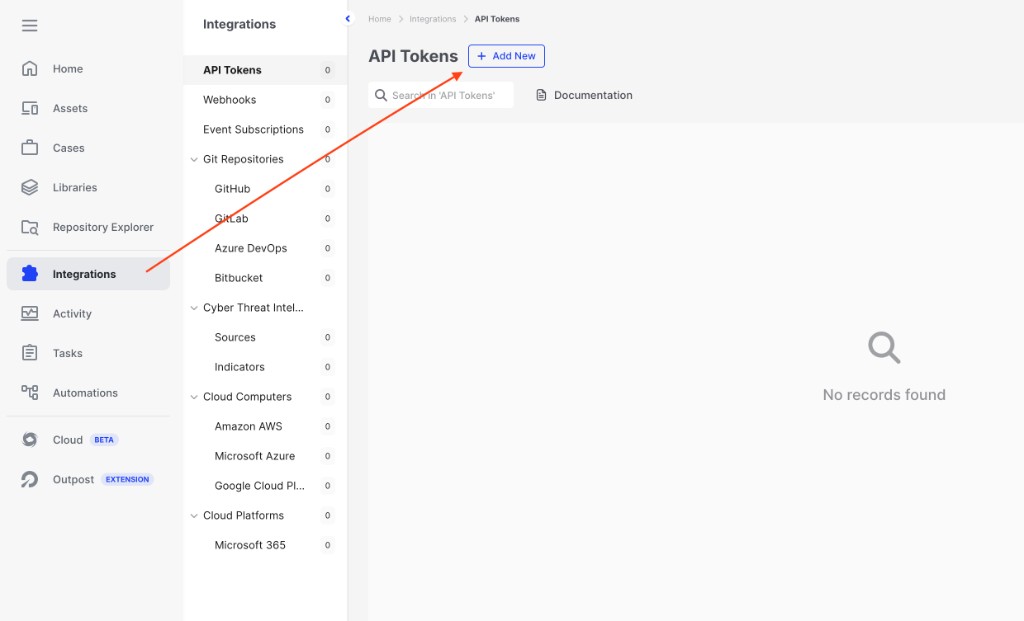
MCP Server Integration: Create a new API token
-
Fill in the New API Token form:
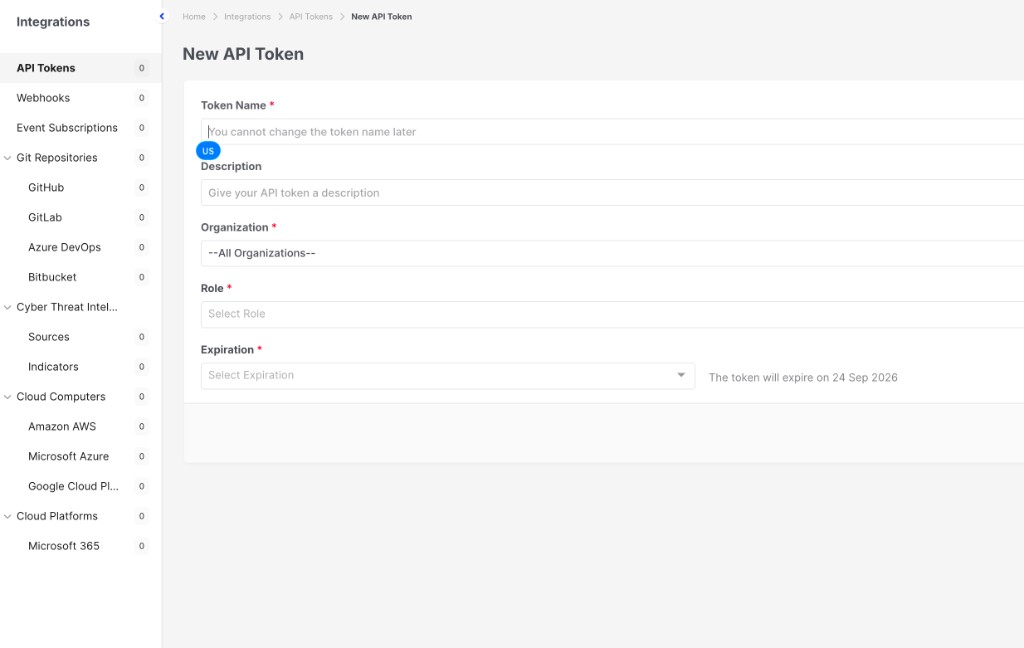
MCP Server Integration: New API Token form
-
Click Save. AIR displays the generated token once.
-
Copy the token immediately and store it in your password manager or secrets vault. It cannot be retrieved again — if you lose it, delete the token and create a new one.
| Field | Recommendation |
|---|---|
| Token Name | Something identifiable, e.g. mcp-cursor-soc-team. The name cannot be changed later. |
| Description | Note who uses the token and from which machine, so it can be revoked confidently later. |
| Organization | Restrict the token to the organizations the assistant should see. —All Organizations— grants access to every organization on the tenant. |
| Role | Apply least privilege. Start with a read-only or analyst role; grant response privileges (isolation, acquisition, InterACT) only if the assistant is meant to perform them. |
| Expiration | Always set one. A 30- or 90-day expiry with a rotation reminder is a good default; avoid “never expires”. |
Step 2: Build your MCP endpoint URL
Section titled “Step 2: Build your MCP endpoint URL”The MCP endpoint is always your AIR Console address followed by /api/v2/mcp:
https://<your-air-console>/api/v2/mcpUse the same hostname and port you use to sign in to AIR in the browser.
| Your AIR Console address | MCP endpoint URL |
|---|---|
https://air-xyz.example.com | https://air-xyz.example.com/api/v2/mcp |
https://air-xyz.example.com:8443 | https://air-xyz.example.com:8443/api/v2/mcp |
Step 3: Add the MCP server to your AI assistant
Section titled “Step 3: Add the MCP server to your AI assistant”Add the following block to your assistant’s MCP configuration file, replacing the two placeholders:
<AIR_MCP_URL>— the URL you built in Step 2<AIR_API_TOKEN>— the token you copied in Step 1
{ "mcpServers": { "binalyze-air": { "url": "<AIR_MCP_URL>", "headers": { "Authorization": "Bearer <AIR_API_TOKEN>" } } }}Worked example
Section titled “Worked example”{ "mcpServers": { "binalyze-air": { "url": "https://air-xyz.example.com/api/v2/mcp", "headers": { "Authorization": "Bearer api_1234567890abcdef1234567890abcdef" } } }}Keep the word Bearer and the single space before the token — the header value is Bearer <token>, not the token on its own.
Where the configuration file lives
Section titled “Where the configuration file lives”| Assistant | Configuration file |
|---|---|
| Cursor (all projects) | ~/.cursor/mcp.json — or Settings > MCP > Add new MCP server |
| Cursor (one project) | <project>/.cursor/mcp.json |
| Claude Desktop (macOS) | ~/Library/Application Support/Claude/claude_desktop_config.json |
| Claude Desktop (Windows) | %APPDATA%\Claude\claude_desktop_config.json |
| VS Code | .vscode/mcp.json in the workspace, or the user-level MCP settings |
If the file already contains other MCP servers, add binalyze-air as an additional entry inside the existing mcpServers object rather than replacing the file.
Save the file and restart the assistant so it picks up the new server.
Step 4: Verify the connection
Section titled “Step 4: Verify the connection”In the assistant
Section titled “In the assistant”Open your assistant’s MCP settings. binalyze-air should be listed as connected, with AIR tools such as assets_read, cases_read, and tasks_read available.
Then ask it something read-only, for example:
“Using AIR, list my organizations.”
“How many endpoints are currently online in AIR?”
A correct answer confirms the endpoint, the token, and the token’s permissions all work.
From the command line (optional)
Section titled “From the command line (optional)”First confirm the token is valid and MCP is enabled on the tenant:
curl -s https://<your-air-console>/api/v2/token/capabilities \ -H "Authorization: Bearer <AIR_API_TOKEN>"A healthy response identifies the caller, lists its privileges, and includes an mcp block. If the mcp block is missing, the MCP endpoint is not enabled on your deployment.
Then call the MCP endpoint itself:
curl -s https://<your-air-console>/api/v2/mcp \ -H "Authorization: Bearer <AIR_API_TOKEN>" \ -H "Content-Type: application/json" \ -H "Accept: application/json, text/event-stream" \ -d '{"jsonrpc":"2.0","id":1,"method":"tools/list","params":{}}'A successful call returns the list of AIR tools the token may use.
What the assistant can do
Section titled “What the assistant can do”AIR exposes its capabilities as tool families. Each family has a read side and, where applicable, a mutate side.
| Area | Typical use |
|---|---|
| Assets | Search and inspect endpoints, review tags, isolate or manage assets. |
| Cases | List, create and update cases; generate a case summary. |
| Tasks | Review task history and check the status of a running task. |
| Acquisition | Launch evidence or image acquisitions and manage acquisition profiles. |
| Hunt | Run and review hunts across the estate. |
| Triage | Run triage with YARA/Sigma/osquery rules and review triage rule libraries. |
| InterACT | Review and run remote interactive sessions and commands. |
| Investigations | Query and update investigation data. |
| Organizations / Metadata | Discover organizations, parameters, and platform metadata. |
The exact tools an assistant sees depend on the role assigned to the API token.
How AIR keeps the connection safe
Section titled “How AIR keeps the connection safe”The MCP server is not a bypass around AIR’s security model. Every request goes through the same checks as the regular AIR API:
- Role-based access control. Tools execute with the token’s role and organization scope. If the role cannot isolate an endpoint in the UI, it cannot isolate one through MCP.
- Organization isolation. A token restricted to certain organizations cannot see or act on the others.
- Preview before execute. Actions that change something run as a preview by default. The assistant has to make a second, explicit call to actually execute them.
- Explicit approval for high-impact actions. Destructive operations, and anything touching evidence or personal data, are refused unless the assistant confirms the user approved them.
- Auditability. Token usage is recorded, and AIR activity performed through the token appears in Activity / Audit Logs filtered by the token’s name.
Troubleshooting
Section titled “Troubleshooting”| Symptom | Likely cause and fix |
|---|---|
404 Not Found from /api/v2/mcp | The MCP endpoint is not enabled on this deployment. Run the capabilities check in Step 4; if there is no mcp block, contact Binalyze support. Also confirm there is no typo in the path. |
401 Unauthorized | Bad, expired, or deleted token; or the header is malformed. Confirm the value is Bearer <token> and that the token is still listed and unexpired under Integrations > API Tokens. |
403 Forbidden on some actions | The token’s role lacks the required privilege, or the target belongs to an organization outside the token’s scope. Adjust the role or scope on the token. |
405 Method Not Allowed | The client is using GET or DELETE. The AIR MCP endpoint is stateless and accepts POST only — use an MCP client that supports streamable HTTP. |
| Server does not appear in the assistant | JSON syntax error in the configuration file, or the assistant was not restarted. Validate the JSON and restart. |
| TLS or certificate errors | The AIR Console uses a certificate the client machine does not trust. Install your organization’s CA certificate on that machine. |
| Connection times out | The client machine cannot reach the AIR Console. Verify firewall, VPN, and that you included the correct port. |
| Assistant sees no tools | The token’s role has no privileges. Assign a role with at least read access. |
Security best practices
Section titled “Security best practices”- One token per assistant or per user. Shared tokens cannot be revoked selectively or attributed in audit logs.
- Least privilege. Grant read-only access first and widen it only when a workflow needs it.
- Scope to organizations. Never issue an all-organizations token when one organization is enough.
- Always set an expiration and rotate on a schedule.
- Never commit the configuration file with a live token to a git repository, and never paste a token into a chat, ticket, or screenshot. If a token is exposed, delete it in Integrations > API Tokens immediately and issue a new one.
- Review usage regularly. Each token shows a usage count and last-used timestamp, and View Logs opens the matching audit entries.
- Decommission promptly. Delete the token when the assistant or the person using it no longer needs access.