

Wazuh Integration
Integration of AIR with Wazuh is possible through the “Integrations” feature.
When Wazuh’s configuration file contains the integration setting with the specified Rule ID, it executes a defined script. The defined Python script sends the relevant information with a POST request to the AIR.
Steps to Integrate
Section titled “Steps to Integrate”Step 1: Create a Trigger for Wazuh
Section titled “Step 1: Create a Trigger for Wazuh”- Visit the Webhooks page in AIR.
- Click the ”+ New Webhook” button in the upper right corner,
- Provide a self-explanatory name (examples: RDP Brute Force Trigger, Phishing Detected Trigger, etc.),
- Select “Wazuh: Wazuh AIR Integration” as the parser for this webhook.
- Select an Acquisition Profile when Wazuh activates this webhook.
- Select the Ignore option or leave with its default value (defaults to 24 hours for recurrent alerts for a single asset).
- Provide other settings, such as Evidence Repository, CPU Limit, Compression, and Encryption, to use or let AIR configure them automatically based on the matching policy.
- Click the “Save” button,
- Hover your mouse over the link below the Webhook name and double-click to copy (see below),
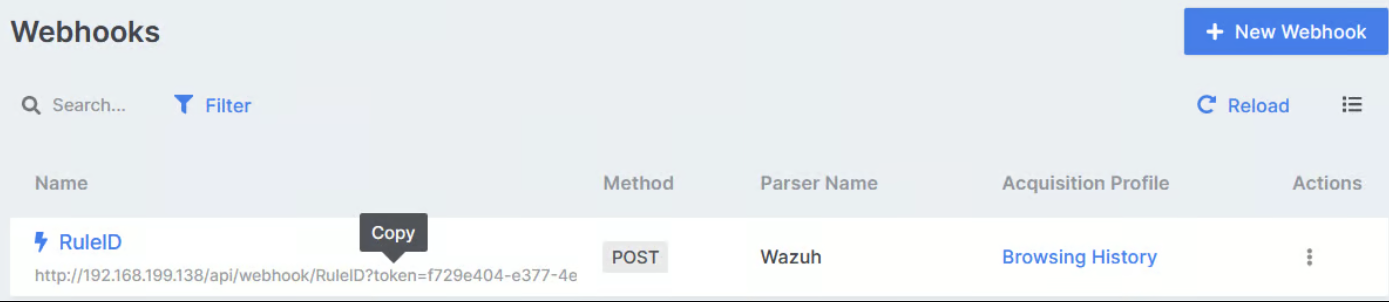
Step 2: Add the Integration Settings in Wazuh
Section titled “Step 2: Add the Integration Settings in Wazuh”Open the ossec.conf file with a preferred text editor and add the following line to the end of the file before closing the ossec_config. The name must be precisely custom-air. For detailed information, please see the Wazuh Documentation.
…  <integration>    <name>custom-air</name>    <hook_url>The Webhook URL copied in Step 1</hook_url>    <rule_id>The Rule ID you want to trigger AIR</rule_id>    <alert_format>json</alert_format>  </integration>
</ossec_config>
Step 3: Creating the scripts in Wazuh
Section titled “Step 3: Creating the scripts in Wazuh”- Every time the relevant rule_id is triggered, a bash script named custom-air is executed. Create a file named custom-air in /var/ossec/integrations/ paste the following script. For detailed information, please refer to the Wazuh Documentation.
#!/bin/sh
WPYTHON_BIN="framework/python/bin/python3"
SCRIPT_PATH_NAME="$0"
DIR_NAME="$(cd $(dirname ${SCRIPT_PATH_NAME}); pwd -P)"
SCRIPT_NAME="$(basename ${SCRIPT_PATH_NAME})"
case ${DIR_NAME} in */active-response/bin | */wodles*) if [ -z "${WAZUH_PATH}" ]; then WAZUH_PATH="$(cd ${DIR_NAME}/../..; pwd)" fi PYTHON_SCRIPT="${DIR_NAME}/${SCRIPT_NAME}.py" ;; */bin) if [ -z "${WAZUH_PATH}" ]; then WAZUH_PATH="$(cd ${DIR_NAME}/..; pwd)" fi PYTHON_SCRIPT="${WAZUH_PATH}/framework/scripts/${SCRIPT_NAME}.py" ;; */integrations) if [ -z "${WAZUH_PATH}" ]; then WAZUH_PATH="$(cd ${DIR_NAME}/..; pwd)" fi PYTHON_SCRIPT="${DIR_NAME}/${SCRIPT_NAME}.py" ;;esac${WAZUH_PATH}/${WPYTHON_BIN} ${PYTHON_SCRIPT} "$@"- Create a python script named custom-air.py /var/ossec/integrations/ and paste the following script. The script runs another python script and makes a request to the air server.
#!/usr/bin/env python
import jsonimport sysimport timeimport os
try:    import requests    from requests.auth import HTTPBasicAuthexcept Exception as e:    print("No module 'requests' found. Install: pip3 install requests")    sys.exit(1)
# ossec.conf configuration:#  <integration>#    <name>custom-air</name>#    <hook_url>Wazuh WebHook URL</hook_url>#    <rule_id>XXXXXX</rule_id>#    <alert_format>json</alert_format>#  </integration>
debug_enabled = Falsepwd = os.path.dirname(os.path.dirname(os.path.realpath(__file__)))json_alert = {}now = time.strftime("%a %b %d %H:%M:%S %Z %Y")
# Set pathslog_file = '{0}/logs/integrations.log'.format(pwd)
def main(args):    debug("# Starting")
    # Read args    alert_file_location = args[1]    webhook = args[3]
    debug("# Webhook")    debug(webhook)    debug("# File location")    debug(alert_file_location)
    # Load alert. Parse JSON object.    with open(alert_file_location) as alert_file:        json_alert = json.load(alert_file)    debug("# Processing alert")    debug(json_alert)    debug("# Generating message")    msg = generate_msg(json_alert)    debug(msg)    debug("# Sending message")    send_msg(msg, webhook)
def debug(msg):    if debug_enabled:        msg = "{0}: {1}\n".format(now, msg)        print(msg)        f = open(log_file, "a")        f.write(msg)        f.close()
def generate_msg(alert):    level = alert['rule']['level']    msg = {}    msg['pretext'] = "WAZUH AIR integration"    msg['Name'] = alert['agent']['name']    msg['IP'] = alert['agent']['ip']    msg['Title'] = alert['rule']['description'] if 'description' in alert['rule'] else "N/A"    msg['Rule ID'] = alert['rule']['id']    msg['ts'] = alert['id']    attach = {'attachments': [msg]}    return json.dumps(attach)
def send_msg(msg, url):    headers = {'User-Agent': 'AIR Script', 'Content-type': 'application/json', 'Accept-Charset': 'UTF-8'}    res = requests.post(url, data=msg, headers=headers)    debug(res)
if __name__ == "__main__":
    try:        # Read arguments        bad_arguments = False        if len(sys.argv) >= 4:            msg = '{0} {1} {2} {3} {4}'.format(                now,                sys.argv[1],                sys.argv[2],                sys.argv[3],                sys.argv[4] if len(sys.argv) > 4 else '',            )            debug_enabled = (len(sys.argv) > 4 and sys.argv[4] == 'debug')
             else:            msg = '{0} Wrong arguments'.format(now)            bad_arguments = True
            # Logging the call        f = open(log_file, 'a')        f.write(msg + '\n')        f.close()
        if bad_arguments:            debug("# Exiting: Bad arguments.")            sys.exit(1)
        # Main function        main(sys.argv)
except Exception as e: debug(str(e)) raise- The scripts must be placed in /var/ossec/integrations, have the same name as indicated in the configuration block, contain execution permissions, and belong to the root user of the ossec group. Execute the following two commands:
#chmod 750 /var/ossec/integrations/custom-air
#chown root:ossec /var/ossec/integrations/custom-air
#chmod 750 /var/ossec/integrations/custom-air.py
#chown root:ossec /var/ossec/integrations/custom-air.py